Stop retyping the same invoice every month.

Tell Lúcido who it's for and how much. You get back a finished invoice or quote — with the right tax breakdown and legal numbering — no fifteen-field forms.

  • No card required
  • From your phone, nothing to install
  • Cancel anytime
QuoteQ-2026-021
Draft

    Total€0.00

    Try it: move the document forward, add a line, or drag the labels.

    Scroll
    RetailHospitalityConsultingRenovationsDesignMarketingTransportTrainingPlumbingPhotographyWeb developmentReal estateWorkshopsBeauty & wellnessEcommerceEventsElectrical workProfessional services

    From "job done" to "paid", in three steps.

    01

    Tell it what you did

    Write in the chat like you would to a colleague: who for, what, how much. You can also build the document by hand, from your phone.

    02

    Check it at a glance

    Lúcido recognises the client, works out the tax breakdown and shows you the result live. If something's missing, it asks — it never guesses.

    03

    Download, send and get paid

    A branded PDF, instantly. When the payment lands, your bank feed is matched to the invoice and you mark it paid with one tap.

    Minimalist desk with a notebook, coffee and a plant by the window

    Four tasks you'll never do again.

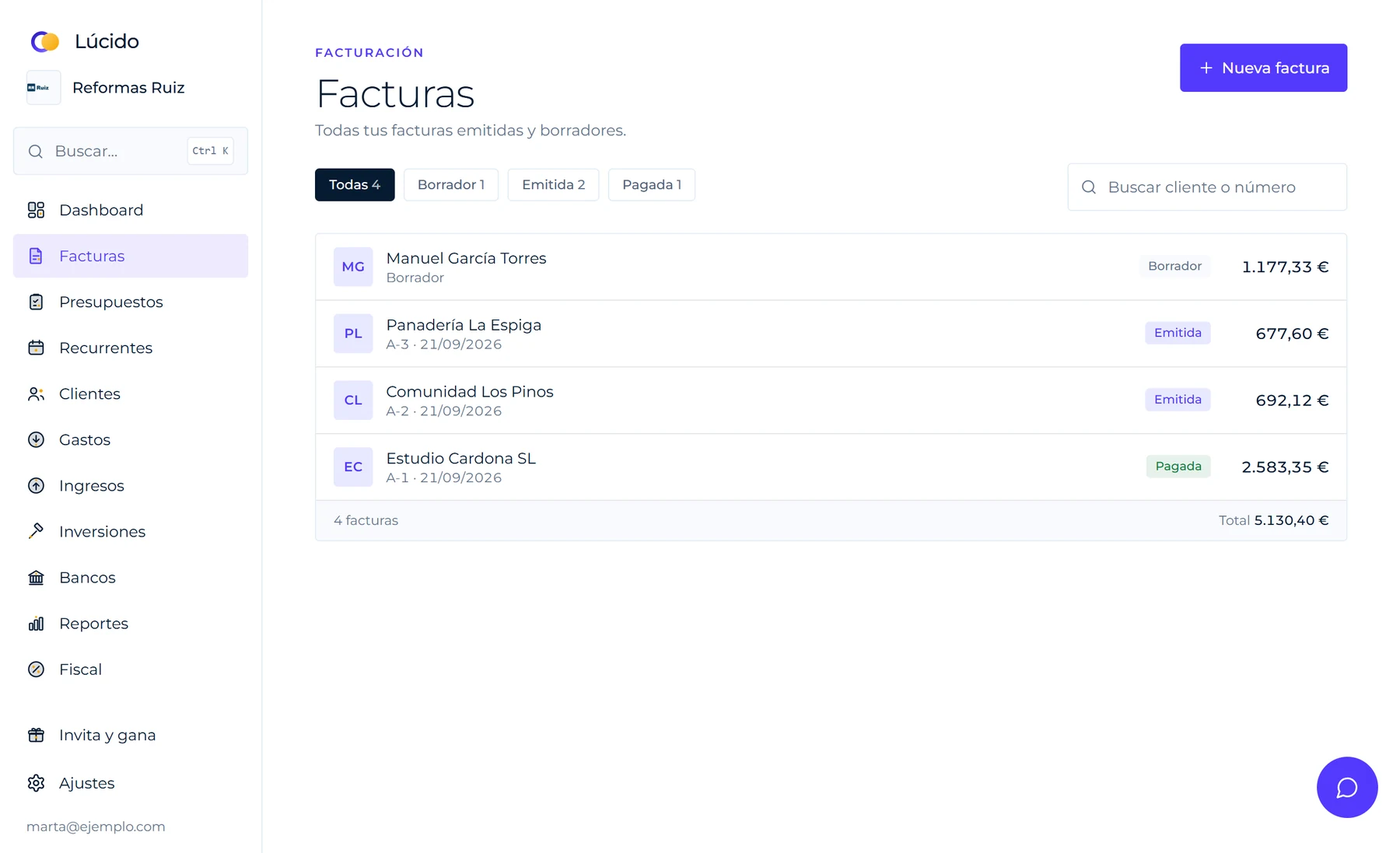
    Lúcido invoices screen listing invoices by status: draft, issued and paid
    Lúcido's invoices screen, with sample data.
    01

    Typing out the same invoice every month

    You say "invoice Estudio Cardona, web design €1,850" and it's done: client, line, tax and numbering.

    02

    Working out tax with a calculator

    Taxable base, tax by rate, withholding and total — all calculated. Nobody has to do the maths by hand.

    03

    Rewriting a quote as an invoice

    When the client accepts, one button. It copies every line and assigns the invoice number.

    04

    Checking your bank for who's paid you

    Connect your bank in read-only mode and, when a payment matches an invoice, mark it paid with one tap.

    60seconds for a full invoice
    6PDF templates with your logo and colours
    14free days, no card

    Everything that happens between asking for the invoice and getting paid.

    Invoice Estudio Cardona: web design €1,850
    Invoice ready · €2,238.50Client recognised, 21% VAT applied.
    A-2026-014DraftPDF
    Add transport, €80
    Chat

    Invoice by talking, not filling in forms

    You write what you did and for whom. Lúcido recognises the client, builds the lines and, if the amount is missing, it asks — it never guesses.

    Taxable base€2,375.00
    VAT 21%€448.35
    VAT 10%€24.00
    Withholding 15%−€356.25
    Total€2,491.10
    Tax

    Taxes done, no surprises

    VAT at 0, 4, 10 or 21%, broken down by rate, personal income tax withholding when you're a self-employed professional, and the equivalence surcharge when it applies.

    A-2026-012Issued€1,210.00
    A-2026-013Issued€340.00
    A-2026-014Draft · editable€2,375.00
    Correction R-2026-001
    corrects A-2026-012
    Compliance

    Numbering that holds up

    Sequential per series, no gaps and no repeats. An issued invoice can't be edited or deleted — it's corrected with a credit note.

    Bathroom tiling18.5 m² × €72.00€1,332.00
    Travel120 km × €0.35€42.00
    Labour6 h × €35.00€210.00
    + Transport / freight+ Mileage
    Units & travel

    Metres, hours and kilometres

    Measure in m, m², m³, hours or kg and add transport, freight or mileage in one tap. You set the rate.

    Kitchen renovationrunning · of 2 h01:42:10
    + 15 min+ 30 min+ 1 h
    Hours

    Timer and hours per project

    Tell it how long you'll take and Lúcido alerts you when time is up; extend it with a tap. Hours are logged per client and move to a draft invoice.

    White tile 30×30Bathroom renovation26 m²
    Wall paintLiving room8 l
    ⚠ Running low: white tile
    Inventory

    Your materials, with their units

    Log what you have and what you use on each project. It comes off the stock, is tied to the client, and goes onto the invoice.

    Income€230.00
    Costs−€130.00
    Profit€100.00
    Margin 43.5%
    Profit

    How much you really make on each project

    Income from hours and materials minus your costs: see each project's profit and margin before it slips away.

    Estudio Cardona SL2 minutes ago€2,238.50
    ⚠ Looks like A-2026-012 from 3 days ago
    Duplicates

    A heads-up before it slips through

    If an invoice, quote or expense looks a lot like a recent one from the same client or for the same amount, you get a warning before you send it. It never blocks you — you decide.

    Estudio Cardona SL2 overdue invoicesHigh risk
    Panadería La Espigapays in 5 days on averageMedium risk
    Comunidad Los Pinosalways pays on timeUp to date
    Collections

    You know who'll pay late

    Using each client's history — overdue invoices and how long they take to pay — Lúcido flags the payment risk before it catches you out again.

    Hardware Store Ruiz15/09/2026€15.40
    Merchant readAmount readCategory: Supplies
    Expenses

    A receipt photo, turned into an expense

    Snap a photo of the receipt and the AI reads the merchant, amount, date and suggests a category. You confirm with one tap — it's never logged without you seeing it first.

    Current account···· 1332€2,500.75
    Estudio Cardona14/09 · bank transfer+€2,238.50
    Mark invoice A-2026-014 paid
    Ferretería Sol11/09−€84.50
    Banking

    Your bank, always up to date

    Balances and transactions from your account, and each invoice marked paid in one tap when the money lands. 1, 3 or 5 banks depending on your plan; read-only access.

    Bar Pepe · P-12sent 9 days ago€363.00
    Follow upRemind me tomorrow
    Follow-up

    Never let a quote go unanswered

    See which quotes have gone days without a reply, schedule when to write to the client again and Lúcido reminds you. Mark them won or lost and track your win rate.

    Issued invoices bookQ312 invoices
    Output VAT€4,210.00
    CSV for Excel
    Accounting

    Your books, ready for your accountant

    Issued-invoice book, expenses book and profit-and-loss by quarter or year, with CSV export for Excel. Prepare them in one click.

    Income in 30 days+€6,480.00
    Payments in 30 days−€2,150.00
    Forecast balance€12,930.00
    Cash flow

    How much money you'll have in 3 months

    The forecast adds up what you expect to collect, payments from your recurring invoices and the expenses that repeat, week by week, so a slow week never catches you off guard.

    Reformas RuizVAT payable€1,250.00
    Bar Pepe3 expenses to review€420.00
    Read-onlyCSV for all
    For your accountant

    All their clients on one screen

    Your accountant gets a free read-only seat and a dashboard with what each quarter needs: invoiced, VAT, expenses to review and pending payments for all their clients.

    Logo size62 pt
    PDF

    Six designs, your brand

    Pick one template for invoices and a different one for quotes, change the colours and adjust the logo size while you watch it update live.

    Built for anyone who invoices, whatever they sell.

    A shop, a caterer, a consultancy or a building crew all invoice just as easily: the lines on a document are free text, with no template locked to a single sector.

    Renovation site: tools and materials in an empty room
    QuoteQ-2026-007

    Manuel García Torres

    • Bathroom flooring and tiling18.5 m² × €72.00€1,332.00
    • Plumbing and fixtures1 × €640.00€640.00
    • Travel120 km × €0.35€42.00
    • Electrician6 h × €35.00 · VAT 10%€210.00
    VAT 21% + 10%€443.94
    Total€2,667.94

    All of your invoicing, on one screen.

    You already know how it works. Now tap each section and browse it as if you were already using it. It's sample data.

    Chat

    Just say it

    Plain language
    Invoice Estudio Cardona: web design €1,850 and 3 months of maintenance at €95
    Here's what I've prepared
    Invoice A-2026-014Estudio Cardona
    Base
    €2,135.00
    VAT 21%
    €448.35
    Total
    €2,583.35
    Review and issueChange something

    Nothing is issued without you confirming it.

    Know how your business is doing without opening a spreadsheet.

    What's owed to you, what you've invoiced, and who to — on one screen, always up to date.

    • Collections without chasing spreadsheetsSee which invoices are pending or overdue and how long they've been waiting.
    • Tax by quarterThe tax summary is calculated from the income and expenses you log, ready to hand to your accountant.
    • Income vs. expensesLog expenses and income or import your history, and watch the trend month by month.

    The things that repeat, that should just happen.

    Four everyday things that shouldn't be stealing your time.

    Photographer adjusting a camera on a tripod in a studio with a reflector and natural light
    • Repeats itself, never sends itself

      For a client's monthly retainer or each quarter's quote: Lúcido leaves a draft ready on the day it's due. You review it and issue it — nothing goes out without you deciding.

    • One client, several departments

      Invoice both Marketing and Admin at the same company, each with its own address and email, sharing the same company name and tax ID. No duplicated clients.

    • Transfers aren't income

      If your bank shows an outgoing and incoming transaction of the same amount between two of your own accounts, Lúcido suggests marking it as a transfer so it doesn't inflate your income, expenses or tax summary.

    • Invoices for your accountant

      Download the issued invoices for each quarter as a CSV, ready to open in Excel.

    Fewer forms, more business.

    Lúcido doesn't compete on having the most modules — it competes on taking work off your plate. That's where we put the effort.
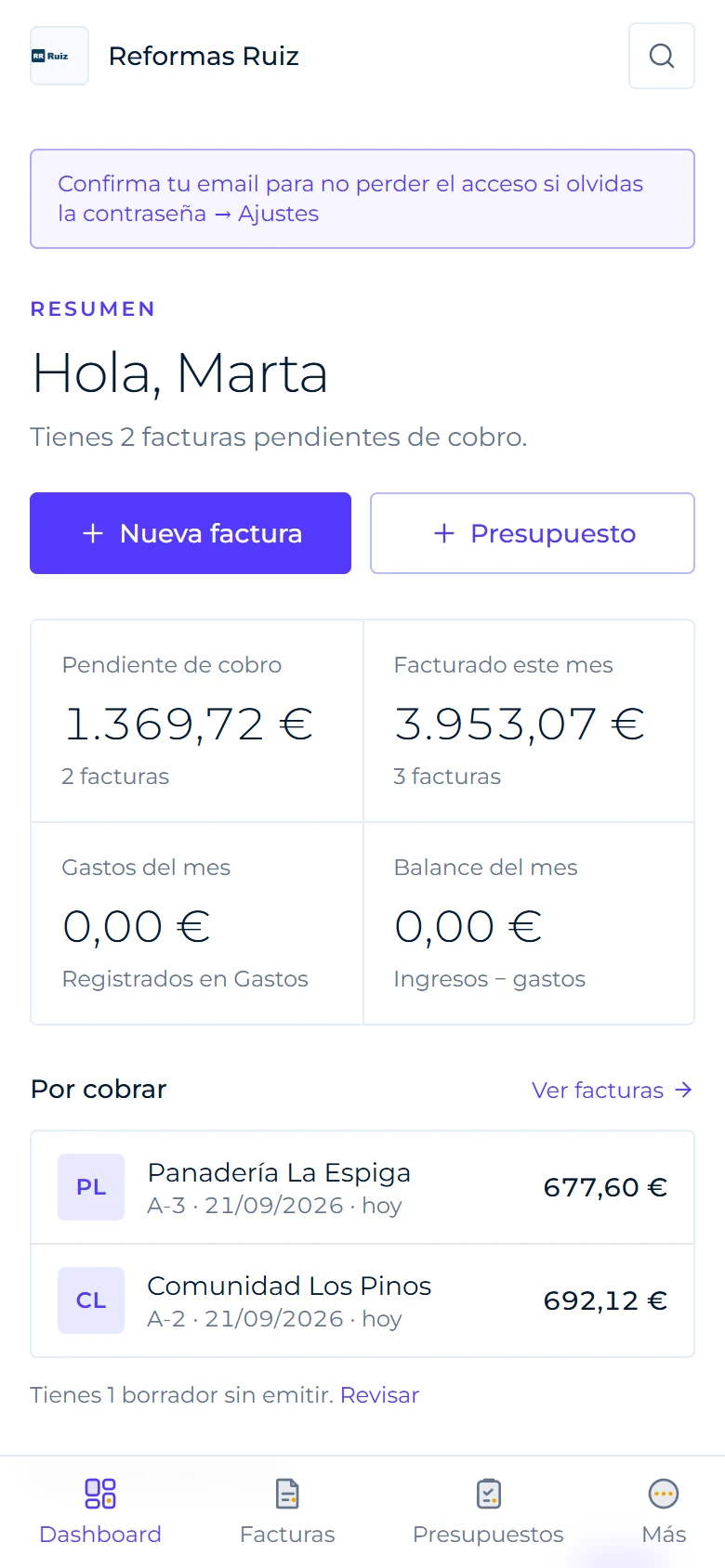
    Lúcido's dashboard on mobile with invoices pending collection and a monthly summary
    The dashboard on mobile, with sample data.
    • You talk, Lúcido documents

      Describe the job in your own words and it prepares the client, lines, tax and numbering. You give the final approval.

      "Invoice Estudio Cardona: €1,850"
    • Built compliant from the start

      Sequential numbering, tax and withholding calculated, and issued invoices that can't be edited — they're corrected with a credit note.

      Series A · A-2026-014
    • From receipt to expense

      Photograph the receipt and Lúcido suggests the merchant, amount, tax and category. Nothing is saved without you confirming it.

      Photo → suggestion → confirm
    • Your accountant looks, doesn't touch

      Invite them with a read-only seat that doesn't use up a spot on your plan.

      Free on every plan
    • Alerts that save you trouble

      Catches duplicate invoices and clients who tend to pay late before they cost you money.

      Duplicates · payment risk
    • Your accounts, your connections

      Slack, Google Calendar and alerts to Zapier or Make already work with your own accounts. More are on the way — see the directory.

      Browse the directory →

    Your business, in your pocket.

    Swipe to see real screens from the app. Screenshots use sample data.
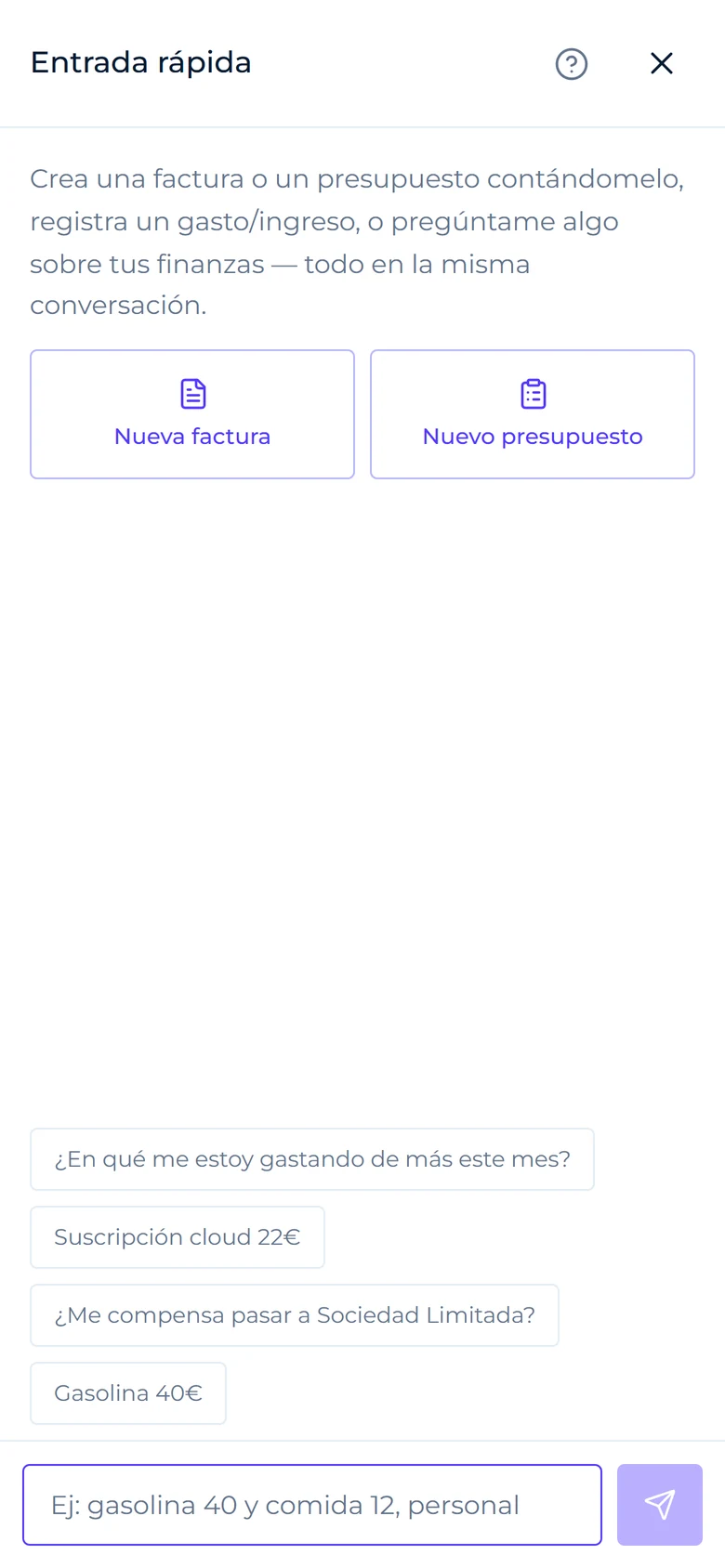
    Lúcido's quick entry screen on mobile, with suggestions for invoices, quotes and expenses
    Write it like you'd say itAn invoice, a quote or an expense in one sentence.
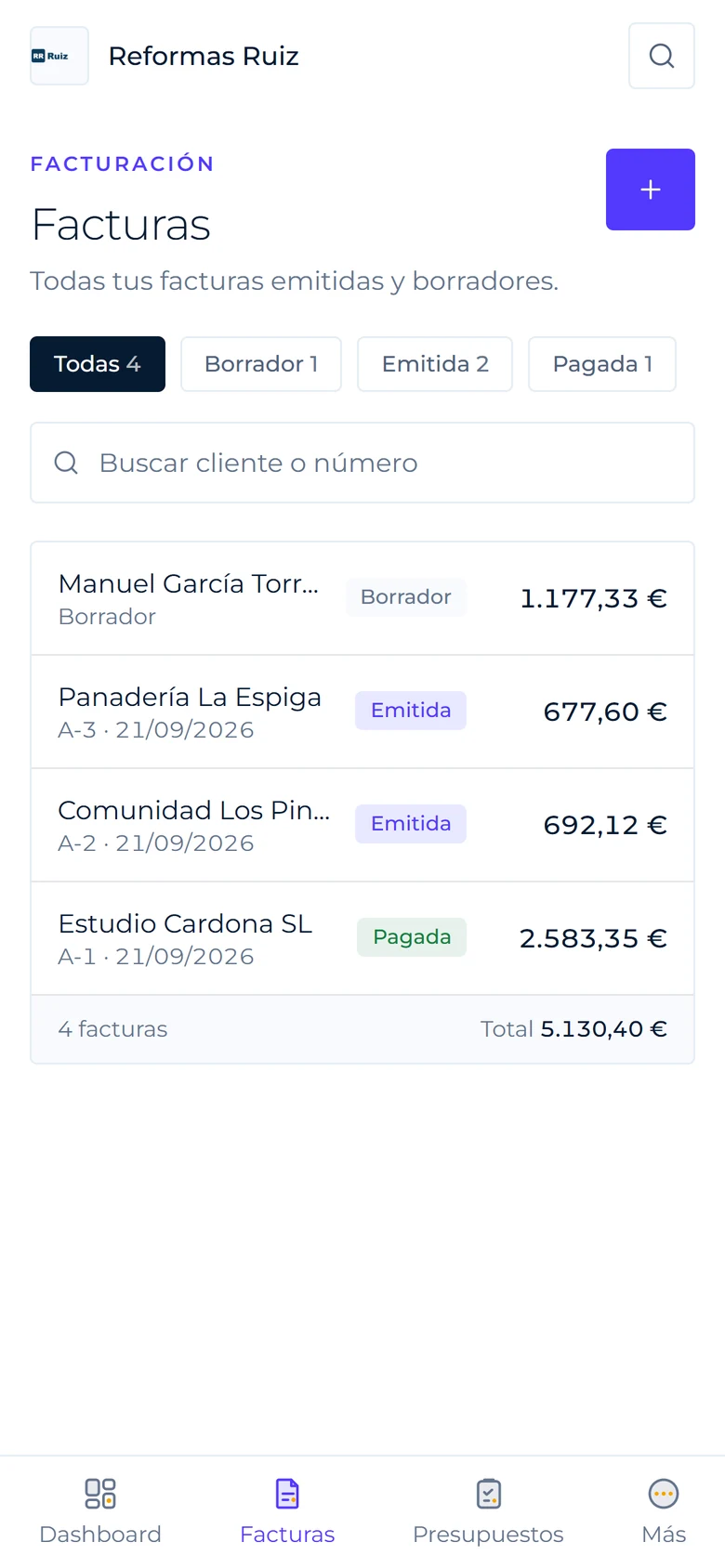
    List of invoices on mobile filtered by status, with the total at the bottom
    All your invoicesBy status, with the total always in view.
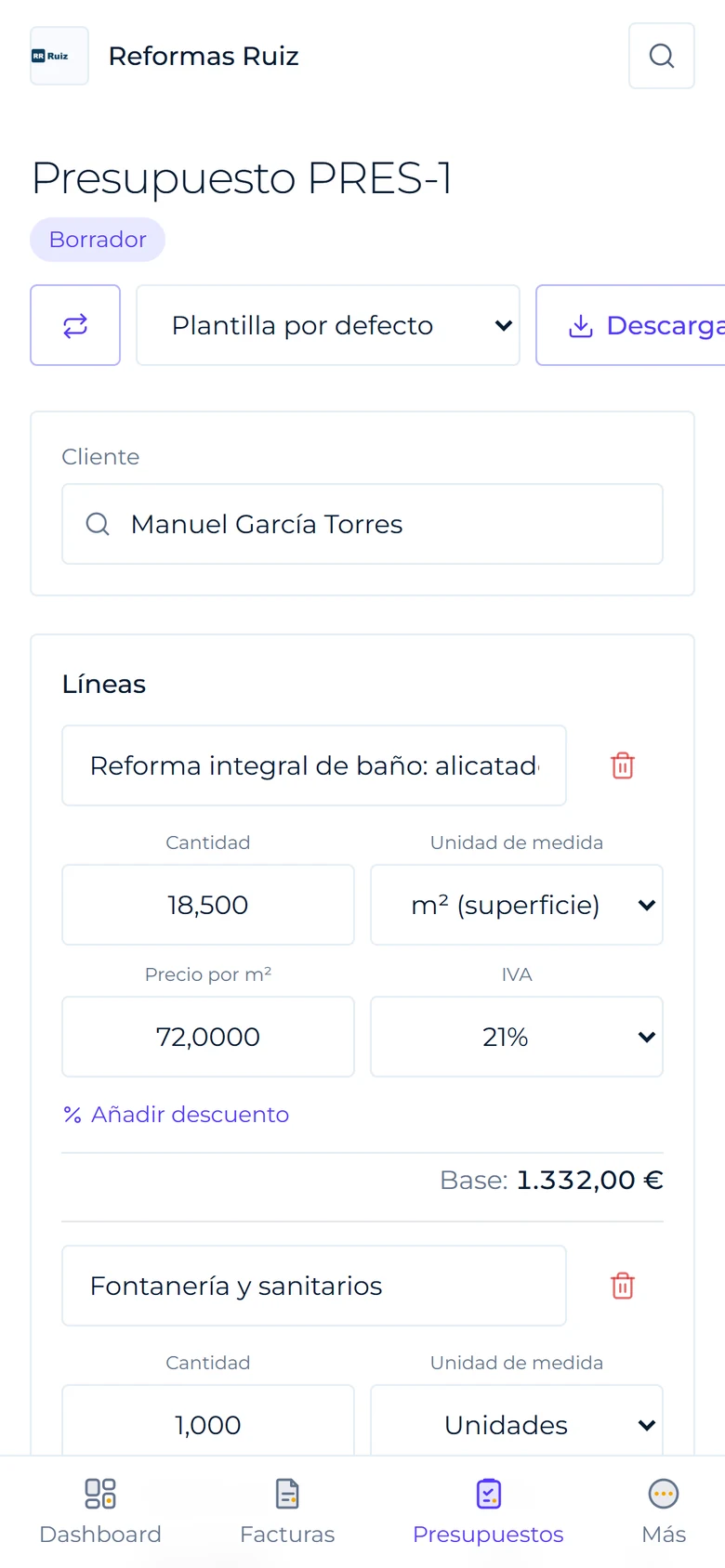
    Draft quote on mobile with line items, tax and total
    Quotes by line itemQuantities, tax and total calculated instantly.
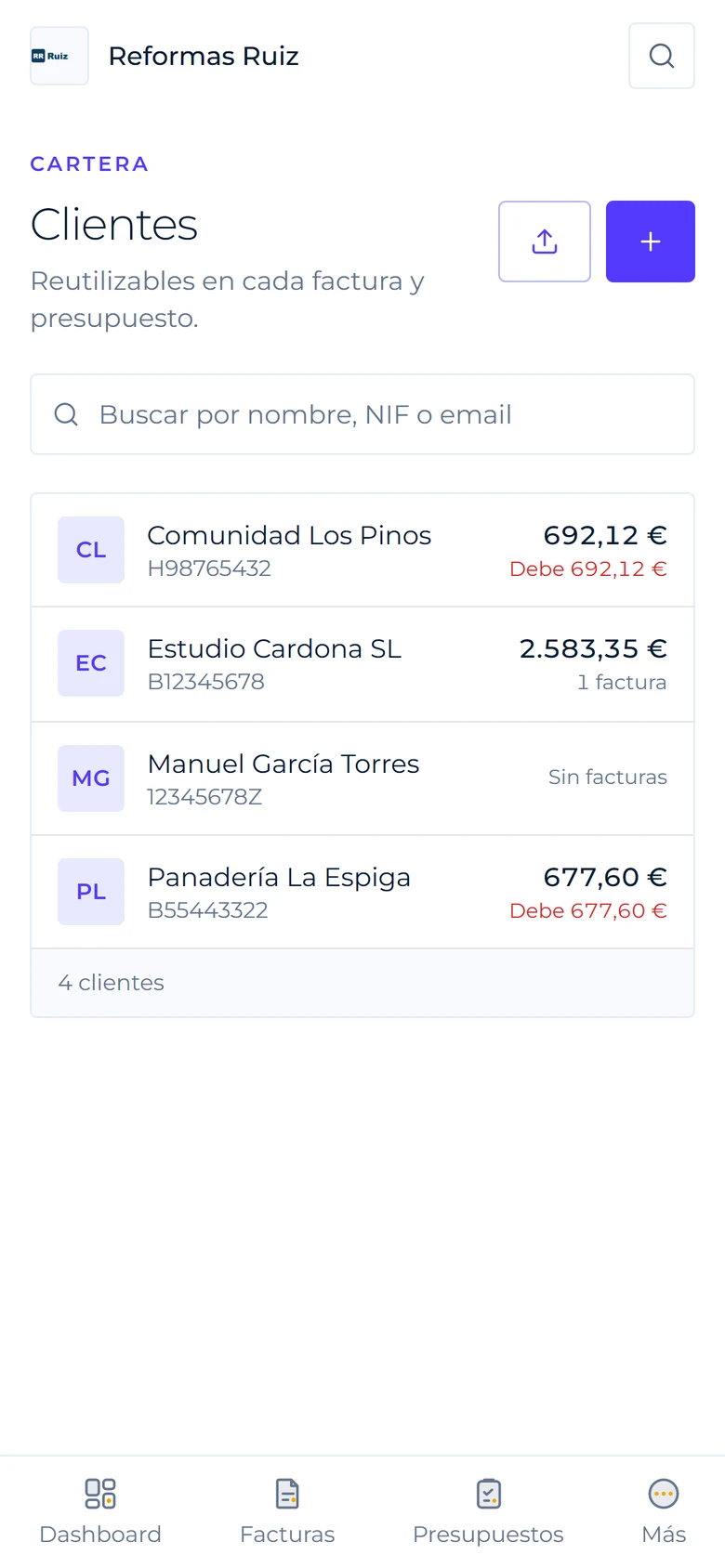
    Client list on mobile with each one's outstanding balance
    Your clients and what they oweEach balance, at a glance.
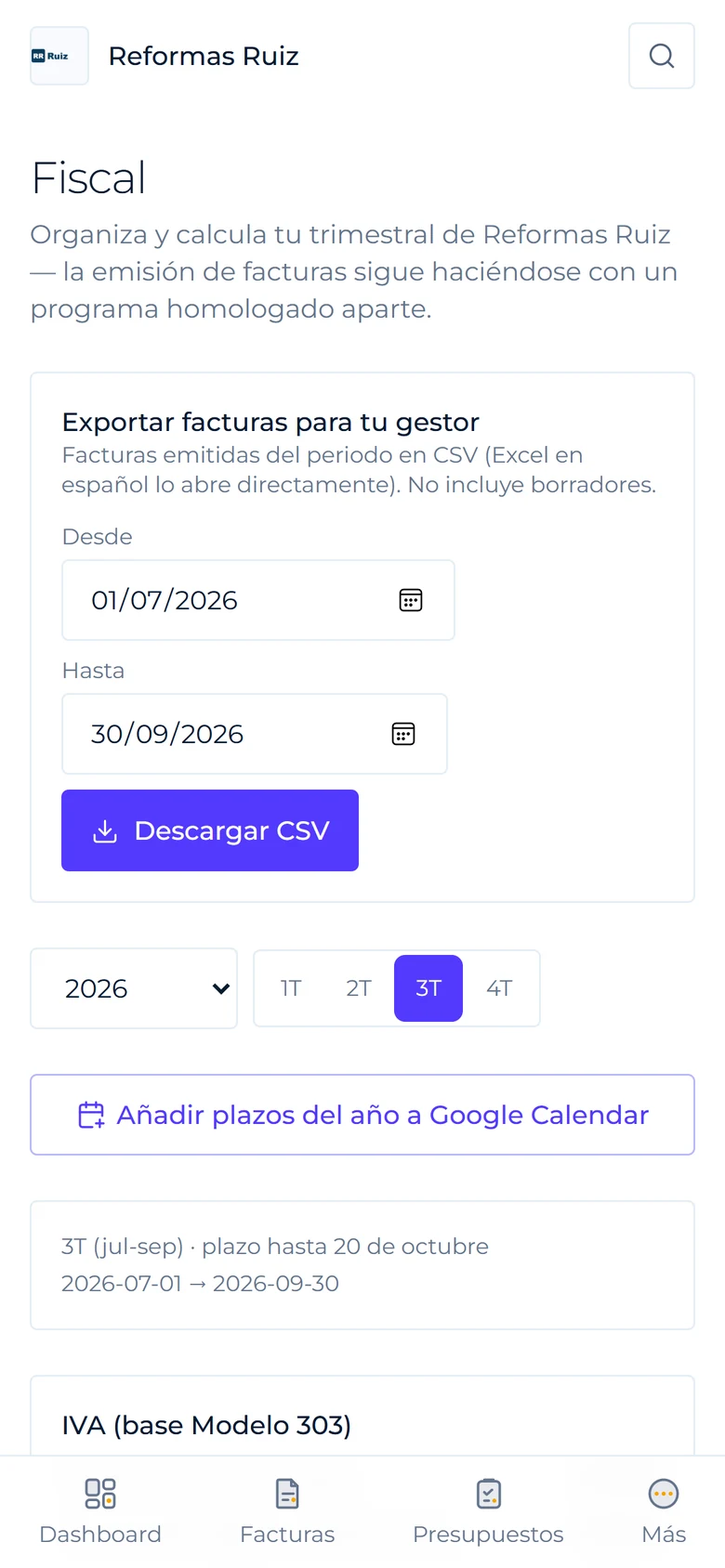
    Tax screen on mobile with the quarter, deadlines and CSV export
    Ready for your accountantQuarterly deadlines and invoice exports in CSV.

    You focus on the job. Lúcido handles the invoice.

    Whether you invoice alone or with a team, and whoever keeps your books — there's a fit for each.

    Self-employed woman working at her desk with a laptop, phone and documents
    Freelancers & small businesses

    Invoicing stops being a chore

    • Invoice or quote with tax, withholding and legal numbering, just by dictating it in the chat.
    • Scan a receipt and it's logged as an expense, no typing required.
    • Get a warning if you're about to duplicate an invoice or a client tends to pay late.
    • Quarterly tax summary, with deadlines added to your Google Calendar.
    Accountants & bookkeepers

    Your accountant, in — for free

    • Invite them with a read-only seat: they see your invoices, quotes and figures without you emailing PDFs.
    • They can't change or delete anything, and it doesn't use up a seat on your plan.
    • If they handle several clients, each one invites them and they view them from the same account.
    • Fewer end-of-quarter emails: everything's already where it should be.
    Creators & agencies

    Quote by what you deliver

    • A deliverables catalogue with base pricing and surcharges for rush or exclusivity.
    • Usage licences with alerts before they expire and one-tap renewal.
    • A media kit with your numbers, ready as a PDF.

    See how it works →

    Connects with what you already use.

    Every business connects its own accounts. Swipe to see what already works and what's on the way.

    • SlackAvailable
    • Google CalendarAvailable
    • StripeAvailable
    • PayPalComing soon
    • BizumAvailable
    • Your bankComing soon
    • RevolutComing soon
    • WiseComing soon
    • KlarnaComing soon
    • Google PayComing soon
    • Apple PayComing soon
    • Google DriveComing soon
    • Google SheetsComing soon
    • DropboxComing soon
    • GmailComing soon
    • Google MeetComing soon
    • ZoomComing soon
    • ZapierAvailable
    • MakeAvailable
    • TypeformComing soon
    • CalendlyComing soon
    • ShopifyComing soon
    • WooCommerceComing soon
    • PrestaShopComing soon
    • WixComing soon
    • SquarespaceComing soon
    • BigCommerceComing soon
    • WordPressComing soon
    • eBayComing soon
    • WhatsAppComing soon
    • IntercomComing soon
    • ZendeskComing soon
    • HubSpotComing soon
    • ZohoComing soon
    • NotionComing soon
    • TrelloComing soon

    Slack notifies you when an invoice is paid or a quote is accepted, and Google Calendar carries your tax deadlines. The rest is coming gradually — and everything connects to your own accounts, never anyone else's.

    Browse the integrations directory →

    What's coming next.

    Alerts to your tools already work. We're building two more pieces so Lúcido can work with your website and your AI assistant.

    1. Coming soon

      An API for your apps

      Let your website or shop create invoices and clients in Lúcido on its own, without typing anything twice.

    2. Coming soon

      Your AI assistant, with your data

      Ask it to look up your invoices or prepare a summary using your business's real figures.

    Three plans. Everything essential in the first one.

    14 free days on any plan. No commitment.

    Basic

    To start invoicing properly.

    €9/mo

    • Unlimited invoices and quotes
    • 50 AI chat messages/month
    • 1 user
    • 1 connected bank
    Start free

    Premium

    For accounting firms and multiple businesses.

    €39/mo

    • Everything in Pro
    • 1,500 AI chat messages/month
    • 4 users
    • 5 connected banks
    • Unlimited businesses
    • Priority support
    Start free

    Prices exclude VAT. See full plan details →

    Refer & earn

    Invite another business and get Pro for free.

    Your invitee starts with 28 free days, no card required. When they pay their first month, you get 30 free days of the Pro plan (or more AI messages if you're already on Pro or Premium). Up to 12 rewarded invitations.
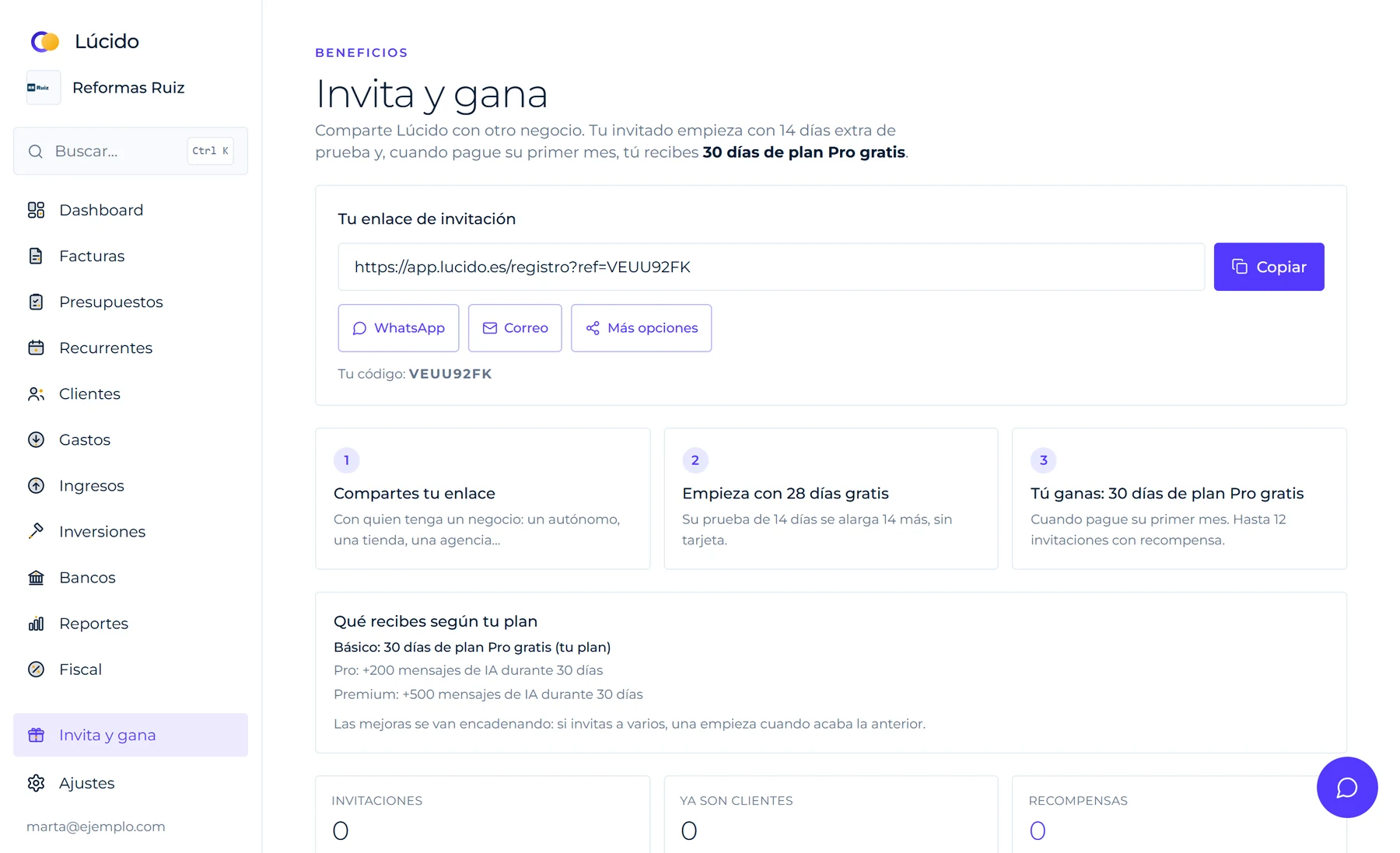
    1. 1Share your linkFrom the app, by WhatsApp or email.
    2. 2Your invitee tries it for 28 days14 standard days plus 14 extra from you.
    3. 3You get 30 days of ProWhen they pay their first month. Already Pro or Premium? More AI messages instead.
    Lúcido's Refer & earn page with your invitation link, the three steps and what you get by plan
    What "Refer & earn" looks like inside the app, with sample data.

    Clear rules, from day one.

    Cancel anytime
    No commitment, no penalties.
    14 days with your real business
    Try it without giving us your card.
    Your accountant gets in free
    A read-only seat, on every plan.
    Works wherever you are
    In the browser and on your phone, nothing to install.
    Bring your history
    Import your expenses and income instead of starting from zero.
    Your connections are yours
    Each business connects and disconnects its own accounts.
    Refer & earn
    Every business you invite starts with 14 extra days, and you get 30 free days of Pro once they pay their first month. How it works
    Free tool

    Just need one invoice right now?

    Create it in a minute with our free generator. No sign-up: one free invoice per email.

    Make an invoice now

    Before you ask.

    Does Lúcido comply with Verifactu?

    Not yet — Verifactu (Spain's approved e-invoicing system) won't be mandatory for every freelancer until 2027. Lúcido's data model is already built to add that layer without a redesign when the time comes.

    Can I use Lúcido if my business isn't "digital"?

    Yes — Lúcido is built for any freelancer or small business: a shop, a restaurant, a consultancy, a building crew, a haulage company or an academy. Invoice lines are free text, with no template locked to a specific sector.

    What happens when the 14-day trial ends?

    You can still view and download what you've already created, but creating new invoices or quotes needs a paid plan. No surprises, no automatic charge without warning.

    Do I need to install an app?

    No — Lúcido runs from your phone's or computer's browser, and can be added to your home screen as an app (PWA) without going through any app store.

    Can the AI make up data on my invoice?

    No. The AI only calculates and assembles from what you tell it — it never invents an amount, a tax ID or a date. If something's missing to create the document, it asks before going further.

    See all questions →

    Your next invoice, in 60 seconds.

    14 free days, no card. Cancel anytime.

    1. 01
      You say it"Invoice Estudio Cardona: web design €1,850"
    2. 02
      Lúcido prepares itClient, lines, tax and numbering A-2026-014
    3. 03
      You download or send itBranded PDF, ready for the client